 DocumentIQ
Turn Documents into
Structured Data
Upload PDFs, define what to extract, and let AI do the rest. Single-pass extraction with GPT-5, Claude, and more — handles tables, line items, and complex layouts out of the box.
Enterprise: private fine-tuning on your data · email inbox intake · Talk to sales →
Everything you need for
document intelligence
From extraction to chat to export — a complete platform for turning unstructured documents into actionable, structured data.
Pre-Built Field Templates
Start projects in seconds with 10 ready-made templates: invoices, contracts, BOMs, COAs, bills of lading, KYC, FNOL, and more. Save your own field sets as reusable templates per organization.
Single-Pass AI Extraction
Send entire PDFs directly to GPT-5, Claude, and more. All fields extracted in one pass — no text pre-processing needed. Handles scanned documents, tables, and complex layouts.
Multi-Row Line Item Extraction
Automatically detects and extracts repeating rows like invoice line items, order details, or contract clauses. No row limits — scales to hundreds of items per document.
Smart Annotations
Draw bounding boxes on PDFs to teach the AI exactly where to look. Set raw text and correct extraction values as few-shot examples. Enable or disable annotations per extraction run.
Multi-Model Support
Choose from OpenAI, Anthropic, and custom fine-tuned models per job. Admin assigns models per billing plan with independent credit rates. Compare outputs across providers.
Feedback & Re-Extraction
Mark extractions as correct, incorrect, or corrected. Re-process selected documents with corrections injected as ground truth. Continuously improve accuracy.
How it works
Get from raw documents to structured data in five simple steps.
Upload Documents
Drag and drop PDFs, DOC, or DOCX files. Documents are stored securely on Azure and ready for processing instantly.
Pick a Template or Configure Fields
Start from 10 pre-built templates (invoices, contracts, BOMs, COAs, BOLs, KYC, FNOL, and more) — or define your own fields. AI auto-suggests extraction instructions.
Annotate (optional)
Draw bounding boxes on a representative PDF to teach the AI which regions map to which fields. Becomes few-shot ground-truth for every similar document thereafter.
Extract & Review
Choose your LLM, hit extract, and watch results stream in real time. Review in a rich table, provide feedback, and re-extract to refine.
Chat & Export
Ask questions across all your documents and extracted data. Export results to CSV, Excel, or PDF. Build on top with the full API.
From your inbox to your ERP — fully automated
DocumentIQ slots into your existing stack. Pull documents from Outlook, SharePoint, Google Drive, Dropbox, or S3. Extract structured data with AI — including line items, signatures, and conditional fields. Push the results into NetSuite, SAP, Salesforce, Snowflake, or any system via REST API or webhook.
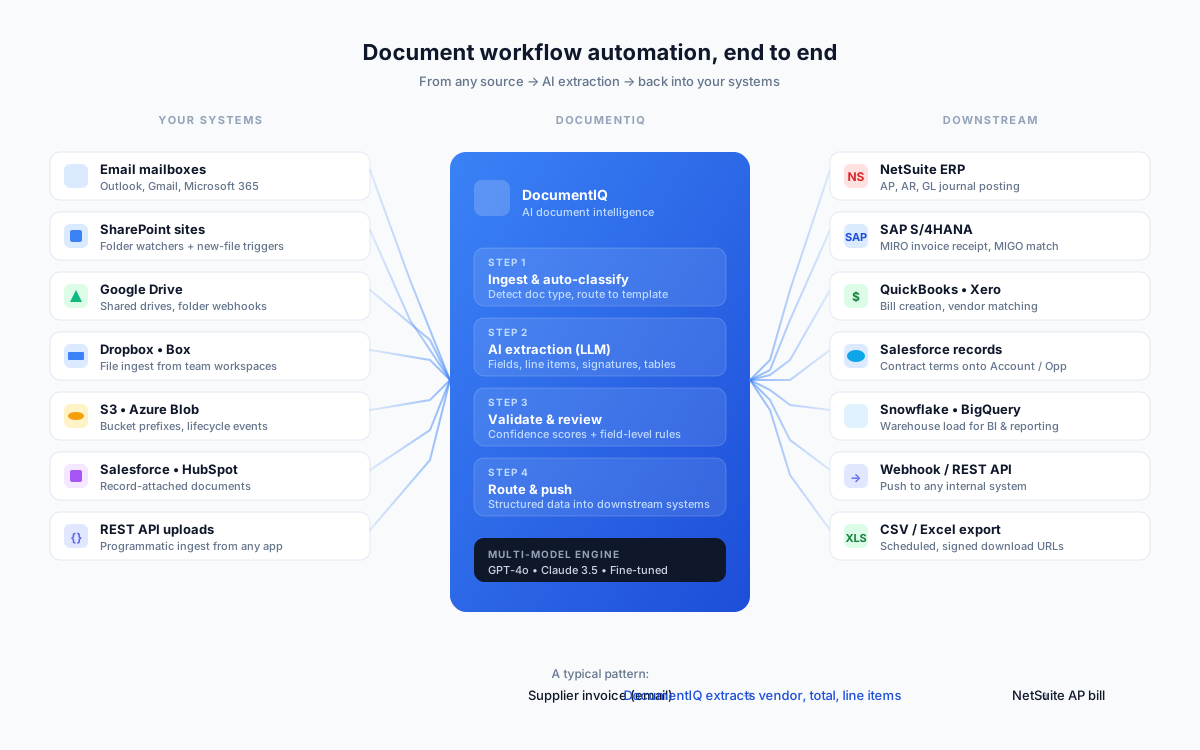
Sources DocumentIQ pulls from
- Email mailboxes — Outlook, Gmail, Microsoft 365 with auto-attachment ingest
- SharePoint & OneDrive — folder watchers and new-file triggers
- Google Drive, Dropbox, Box — shared drive webhooks
- Amazon S3 & Azure Blob — bucket prefixes, lifecycle events
- Salesforce & HubSpot attachments — pull from any CRM record
- REST API uploads — programmatic ingest from any internal app
Destinations DocumentIQ pushes to
- NetSuite — AP, AR, GL journal posting from extracted invoices
- SAP S/4HANA — MIRO invoice receipt, MIGO three-way match
- QuickBooks & Xero — auto-create bills and match vendors
- Salesforce records — push contract terms onto Account or Opportunity
- Snowflake & BigQuery — warehouse load for BI and reporting
- Webhook & REST API — push to any internal system, plus scheduled CSV / Excel export
Common end-to-end patterns
- Supplier invoice arrives in a shared Outlook inbox → DocumentIQ extracts vendor, PO reference, line items, and totals → bill posts directly to NetSuite AP with the right GL coding.
- Customer contract drops into a SharePoint folder → DocumentIQ extracts escalation clauses, renewal dates, and obligation terms → structured fields land on the matching Salesforce Account.
- Bill of lading emailed from a carrier → DocumentIQ extracts shipper, consignee, HS codes, container counts → record created in your TMS or customs broker system via webhook.
- Mill test certificate arrives with a steel shipment → DocumentIQ extracts chemistry and mechanical properties → auto-validated against spec, results streamed into Snowflake for compliance reporting.
Start in seconds,
not hours
Skip the blank-canvas problem. DocumentIQ ships with 10 pre-built field templates covering the most common document workflows — each with field definitions, AI extraction prompts, and project context already configured. Apply one with a click, then customize as needed.
- Invoices, POs, contracts, BOMs, COAs, BOLs, packing declarations, KYC, FNOL, and more
- Multi-row line item structures encoded for tables and repeating data
- Domain-specific extraction prompts (e.g., escalation clause types, ISO 6346 container numbers, CAS numbers)
- Save your own custom fields as reusable templates for your team


Define exactly what
you want extracted
Every project has its own schema. Define each field's name, type, description, and a custom extraction prompt — and DocumentIQ writes the LLM instructions for you with a single click. Mark fields as repeating to capture multi-row tables with parent-child structure intact.
- Field types: text, number, date, boolean, list
- AI-suggested extraction prompts you can edit or rewrite
- "Repeating (line item)" toggle for invoices, BOMs, customs manifests
- Reorder, duplicate, or save fields as a reusable template
Structured data,
with confidence scores
Every extracted value carries a confidence score and a link back to the source page and bounding box. Review thousands of rows in a sortable table, flag bad extractions inline, and export to CSV or Excel — or pull the data via API into your ERP, CRM, or BI tool.
- Per-field confidence bars surface ambiguous extractions for review
- Inline thumbs-up / thumbs-down feedback feeds the next extraction run
- Summary cards: documents processed, fields extracted, credits used
- Export to CSV, Excel, or pull via REST API


Annotate once,
extract accurately forever
Draw a box on a representative PDF for each field — single value or multi-row table. The annotations become few-shot examples that dramatically improve accuracy across every similar document from that vendor, carrier, or format thereafter.
- Auto-detect raw text from PDF regions using PyMuPDF
- Single-value boxes for headers; multi-row boxes for line-item tables
- Annotations become ground-truth examples in the LLM prompt
- Toggle annotations per extraction run for A/B testing
Ask questions across
all your documents
Three context modes let you query raw documents, extracted data tables, or both. The AI cites specific documents, renders markdown tables, and you can export entire conversations as PDF.
- RAG-powered with vector search across document chunks
- SQL generation for analytical queries over extracted data
- Streaming responses with markdown rendering
- Export conversations as PDF, Markdown, or JSON
Built for teams and organizations
Multi-tenant architecture with role-based access, custom billing, and white-label branding. Deploy on Azure or on-premise.
RBAC & Multi-Org
Owner, admin, member, viewer, and billing roles per organization
White-Label
Custom logo, brand colors, and company name for each organization
Custom Invoicing
Enterprise billing with offline invoicing, no credit card required
Fine-Tuned Models
Bring your own fine-tuned models via LiteLLM for domain-specific accuracy
Trusted across industries
See how teams extract structured data from thousands of documents at scale.
Proactively identifying price escalation clauses across 1,200+ contracts
A global mobility and professional services company used DocumentIQ to systematically parse thousands of vendor and client contracts, surfacing price escalation clauses before they triggered — saving millions in unanticipated cost increases.
Unifying 4 invoice formats into a single structured data lake
A large manufacturing company's procurement team used DocumentIQ to digitize invoices arriving in wildly different formats from hundreds of vendors, feeding clean, structured data directly into their enterprise data lake.
What teams are saying
“We went from manually reviewing 1,200 contracts over three months to having every escalation clause extracted and queryable in under 48 hours. The sell-side recovery alone paid for the platform 10x over.”
VP of Procurement
Global Mobility & Professional Services
“Our AP team was drowning in invoices from 200+ vendors in completely different formats. DocumentIQ handles all of them with a single field configuration. We eliminated manual data entry entirely.”
Procurement Director
Manufacturing
“The chat feature changed how we work with extracted data. Instead of building reports, dispatchers just ask "which shipments to Dallas are overweight?" and get an instant answer with cited documents.”
Operations Manager
Freight & Logistics
Built for teams that need more
Two capabilities reserved for our Enterprise tier — designed for the volume, privacy, and integration needs of larger operations.
Your AI gets smarter with every correction — privately
We fine-tune a model on the corrections your team makes. Your data never leaves your tenant. The resulting model is yours alone — competitors don't benefit from your accuracy gains.
- →Per-organization model trained on your
feedback_entries - →Accuracy compounds with usage — flat for every competitor
- →Strict tenant isolation; auditable training data lineage
Forward an invoice. See it extracted in 30 seconds.
Point a shared mailbox at DocumentIQ. Attachments auto-ingest, get processed, and land in your queue — or push straight to your ERP. No upload step, no behaviour change for the people already in the email loop.
- →Dedicated inbound address per project (or forward from your own)
- →Auto-extracts PDFs, DOCs, and inline body text
- →Webhook + ERP push so extracted data lands where you need it
Custom SLAs, dedicated support, and other Enterprise capabilities also covered.
Simple, transparent pricing
Start free, upgrade as you grow. No hidden fees.
Free
50 pages free, lifetime — no card required
- 50 pages total (one-time grant)
- 2 projects, 10 fields per project
- Standard LLM (GPT-4o Mini)
- CSV export
- Community support
Starter
For teams getting serious about extraction
- 500 pages per month
- 10 projects
- All standard LLMs
- Project chat assistant
- PDF annotations & feedback loops
- Excel, CSV & PDF export
- Email support
Business
Built for production document volume
- 5,000 pages per month
- Unlimited projects
- Premium LLMs (GPT-4o, Claude Opus)
- Document summaries & analytics
- Multi-row line item extraction
- White-label branding
- Priority email support
Enterprise
For organizations with custom requirements
- Everything in Business
- Unlimited pages — custom pricing
- Private fine-tuned models
- Custom offline invoicing
- Dedicated account manager
- SSO / SAML integration
- On-premise deployment option
Frequently asked questions
Everything you need to know about DocumentIQ.
Do I have to define every field from scratch?
How is DocumentIQ different from traditional OCR?
What file formats are supported?
Which AI models can I use?
What are annotations and how do they improve accuracy?
Can DocumentIQ extract line items and tables?
How does the chat assistant work?
Is DocumentIQ suitable for enterprise use?
How much does it cost?
Ready to extract smarter?
Join teams using DocumentIQ to turn unstructured documents into actionable, structured data — in minutes, not hours.